---
canonical: "https://www.jsolly.com/blog/Adding-code-snippets-ckeditor/"
title: "Adding Code Snippets to ckeditor: A Step-by-Step Guide"
description: "Learn how to quickly and easily add Code Snippets and plugins to ckeditor. Follow this guide to install plugins and format code snippets in your blog posts."
author: "John Solly"
published: "2021-12-31T07:20:23.000Z"
updated: "2021-12-31T07:20:23.000Z"
---
# Adding Code Snippets to ckeditor: A Step-by-Step Guide
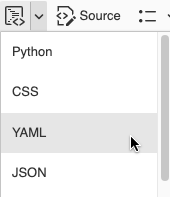
I realized when making posts that ckeditor does not include a code snippets tool. This is useful functionality because it lets you copy/paste code into your post and formats it depending on the language type.
Went over to ckeditor's plugin page and found [Code Snippets](https://ckeditor.com/docs/ckeditor4/latest/features/codesnippet.html). Installing it was easy using the [ckeditor builder](https://ckeditor.com/cke4/builder). You add all the plugins you want, choose a theme, and download a prepacked .zip file containing everything you need. All you have to do is was copy it into your /static/ckeditor folder.
print("Hello World")
December 31, 2021 in [Web Dev](https://www.jsolly.com/blog/category/web-dev/)
Updated December 31, 2021