---
canonical: "https://www.jsolly.com/blog/UI-enhancement-leads-to-major-architecture-changes/"
title: "Django Context Processors and Multi-Stage Migrations: Lessons Learned"
description: "Sometimes minor features need large technical lifts. How a small UI change pushed me to learn Django’s Context Processors and DB Migrations."
author: "John Solly"
published: "2022-06-01T18:20:08.000Z"
updated: "2024-12-23T23:19:07.658Z"
---
# Django Context Processors and Multi-Stage Migrations: Lessons Learned
Who would have thought the number of posts per category as a badge icon could be tricky? This small UI change taught me about Django's context processors and multi-stage database migrations.
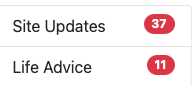
It all started when I found an example on the Bootstrap Docs showing [count badges on list items](https://getbootstrap.com/docs/4.0/components/list-group/#with-badges). I imagined injecting the category count into a template.
# templates/sidebar.html
{ category.posts_count }}
Only, I needed the post\_count for every category returned in a QuerySet. I found a promising function in the Django QuerySet doc called [annotate()](https://docs.djangoproject.com/en/4.0/ref/models/querysets/#annotate)
> Annotates each object in the **QuerySet** with the provided list of [query expressions](https://docs.djangoproject.com/en/4.0/ref/models/expressions/). An expression may be a simple value, a reference to a field on the model (or any related models), or an aggregate expression (averages, sums, etc.) that has been computed over the objects that are related to the objects in the **QuerySet**.
>
> [Official Django Doc](https://docs.djangoproject.com/en/4.0/ref/models/querysets/#annotate)
The key here is _related_ models. For annotate( ) to work with multiple models, they need to be related. The only problem with my data model was that Post and Category didn’t know each other! Here is how my Post model looked. The category field is a CharField with no foreign/primary key relationship with the Category class.
# models.py
class Post(models.Model):
    title = models.CharField(max_length=60)
    category = models.CharField(max_length=100, default="uncategorized")
    content = CKEditor5Field(blank=True, null=True, config_name='extends')
In my CategoryView, I filtered posts by performing a string match between the Post's category and the Category name by saying something like, "Give me all the Posts that have a category matching the string of the category's name pulled from the URL.
# models.py
class CategoryView(ListView):
    model = Post
    def get_queryset(self):
        cat = self.kwargs.get("cat").replace("-", " ")
        posts = Post.objects.all()
        return posts.filter(category=cat)
When a User navigated to `/category/site-updates/`, the code would take 'site-updates,' remove the hyphen and query the Post table.
SELECT *
FROM Post
WHERE category = "site updates"
Here is how you change a column from CharField to ForeignKey.
1. Create the new field and populate all the cells with null values
2. Use the RunPython function to copy data into it.
3. Delete the old field and re-name the new one to the name of the old one.
I accomplished this with three migrations.
Post table BEFORE migration
| post_id | category |
|---|
| 0 | site updates |
| 1 | life advice |
| 2 | life advice |
Category Table
| category_id | name |
|---|
| 0 | life advice |
| 1 | site updates |
I first added a column to models.Post called category\_link. This is the empty field I’ll use to copy category ids into.
# models.py
class Post(models.Model):
    title = models.CharField(max_length=60)
    category = models.CharField(max_length=100, default="uncategorized")
    category_link = models.ForeignKey(Category, null=True, on_delete=models.CASCADE)
    content = CKEditor5Field(blank=True, null=True, config_name='extends')
After adding category\_link, I run.
$ python3 manage.py makemigrations --name add_temp_category_link_field blog
This generates a new migration file that will add the new field to the Post table to create a relationship with the Category table.
# migrations/0017_add_temp_category_link_field.py

from django.db import migrations, models
import django.db.models.deletion
class Migration(migrations.Migration):
    dependencies = [
        ('blog', '0016_add_alt_txt_to_meta_img'),
    ]
    operations = [
        migrations.AddField(
            model_name='post',
            name='category_link',
            field=models.ForeignKey(null=True, on_delete=django.db.models.deletion.CASCADE, to='blog.category'),
        ),
    ]
$ python manage.py migrate
| Post | Category | category_link |
|---|
| 0 | site updates | |
| 1 | life advice | |
| 2 | life advice | |
The second and third migrations are more hands-on. You need to create empty migrations and then modify them to perform additional actions.
$ python3 manage.py makemigrations --empty --name transfer_categories blog
# migrations/0018_transfer_categories.py
from django.db import migrations
class Migration(migrations.Migration):
    dependencies = [
        ("blog", "0017_add_temp_category_link_field"),
    ]
    operations = [

    ]
The magic happens in `migrations.RunPython` which runs Python as part of the migration. I transfer data from the category column to the newly created category\_link field.
# migrations/0018_transfer_categories.py
from django.db import migrations
def link_categories(apps, schema_editor):
    Post = apps.get_model('blog', 'Post')
    Category = apps.get_model('blog', 'Category')
    for post in Post.objects.all():
        category, created = Category.objects.get_or_create(name=post.category)
        post.category_link = category
        post.save()
class Migration(migrations.Migration):
    dependencies = [
        ("blog", "0017_add_temp_category_link_field"),
    ]
    operations = [
        migrations.RunPython(link_categories)
    ]
I perform string matching again, but it's allowing me to copy the category ids into my Post table instead of the category name.
$ Python3 manage.py migrate
| Post | Category | category_link |
|---|
| 0 | site updates | 1 |
| 1 | life advice | 0 |
| 2 | life advice | 0 |
I could stop here, but Django is touted as the web framework for [perfectionists with deadlines](https://www.djangoproject.com/); I am one of them!
Another empty migration.
$ python3 manage.py migrate --empty --name remove_category_rename_category_link blog
I modify to include logic that removes the old category field and then rename category\_link to category.
# migrations/0019_remove_category_rename_category_link.py
from django.db import migrations
class Migration(migrations.Migration):
    dependencies = [
        ("blog", "0018_transfer_categories"),
    ]
    operations = [
        migrations.RemoveField(
            model_name="post",
            name="category",
        ),
        migrations.RenameField(
            model_name="post",
            old_name="category_link",
            new_name="category",
        ),
    ]
$ Python3 manage.py migrate
Looks good to me!
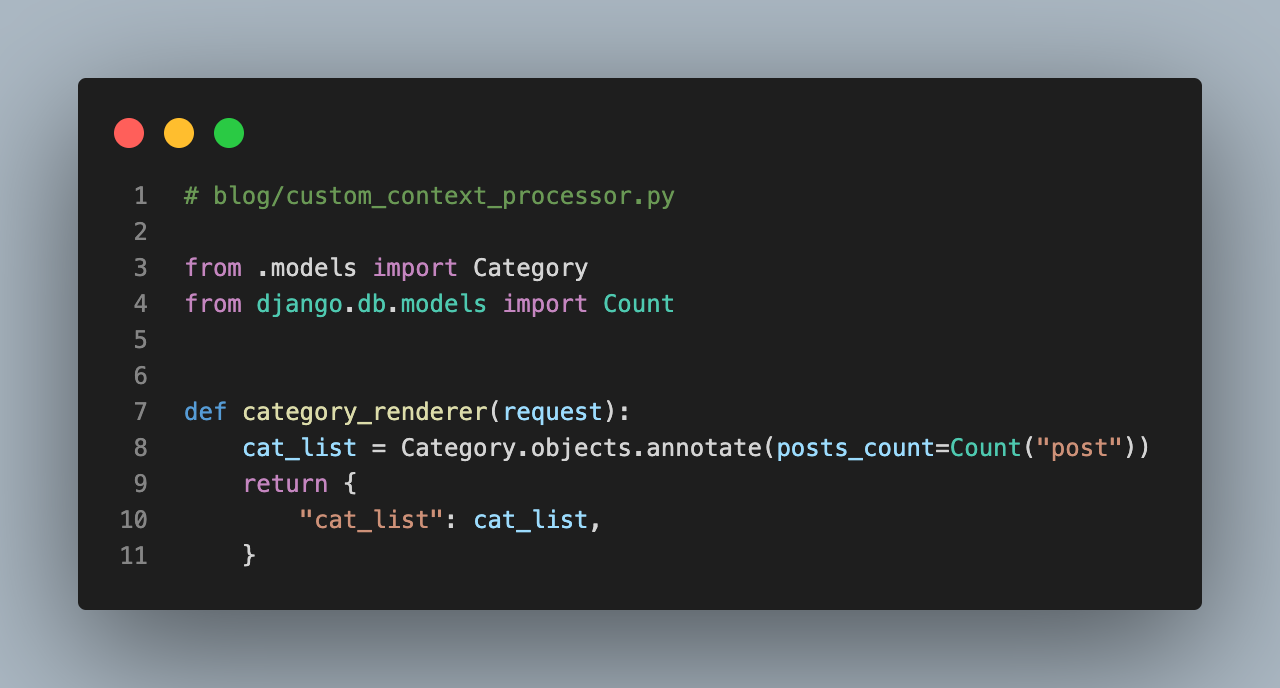
Now it's on to the context processor that leverages all this hard work at the database level.
# blog/custom_context_processor.py
from .models import Category
from django.db.models import Count


def category_renderer(request):
    cat_list = Category.objects.annotate(posts_count=Count('post'))
    return {
        "cat_list": cat_list,
    }
The magic is all happening on **line 7.** For every category object, I add a Count( ) of posts. Getting the category post count in a template is as easy as `{{ category.posts_count }}`
The last step is adding a context processor to settings.py, so Django knows to add it to the context in all templates.
# settings.py
TEMPLATES = [
    {
        "BACKEND": "django.template.backends.django.DjangoTemplates",
        "DIRS": [],
        "APP_DIRS": True,
        "OPTIONS": {
            "context_processors": [
                'blog.custom_context_processor.category_renderer'
            ]
        }
    }
]
I removed duplicate category code from my views because the context processor is now adding categories (and their post count) to every template’s context.
The last piece is creating the template code.
# templates/sidebar.html
<h3>Navigate to a Category</h3>
{% for cat_item in cat_list %}
<a href="{% url 'blog-category' cat_item|slugify %}"
  class="list-group-item list-group-item-action {% if request.resolver_match.kwargs.cat == cat_item|slugify %}active{% endif %}"
  id="sidebar-{{ cat_item|slugify }}">{{cat_item|title}}
  <span class="badge rounded-pill bg-danger float-end">{{ cat_item.posts_count }}</span>
</a>
{% endfor %}
The end result is count badges in the sidebar.
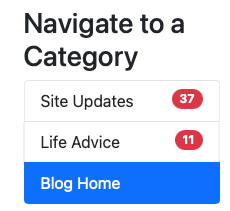
Crazy how what might seem trivial is actually a major technical undertaking.
June 1, 2022 in [Web Dev](https://www.jsolly.com/blog/category/web-dev/)
Updated December 23, 2024