---
canonical: "https://www.jsolly.com/blog/compress-minify-assets-69-percent-faster-page-load/"
title: "Boost Page Speed: Minification and Compression for Static Assets"
description: "Boost Your Website's Speed: How Compression and Minification Can Help You Reduce Your Payload Size by Up to 40%, For a Faster, More Responsive Website."
author: "John Solly"
published: "2022-06-17T12:10:31.000Z"
updated: "2024-11-06T13:40:23.429Z"
---
# Boost Page Speed: Minification and Compression for Static Assets
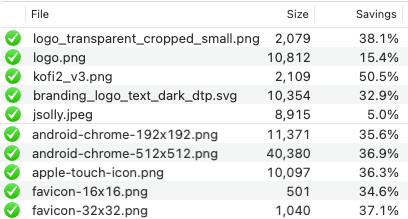
Caching static assets is only half the game. Adding minification and compression dramatically boosts page speed. With [this PR,](https://github.com/jsolly/awesome-django-blog/pull/114) all CSS/JS is now compressed and minified via [WhiteNoise](https://whitenoise.evans.io/en/stable/), HTML minified via [GzipMiddleware](https://docs.djangoproject.com/en/4.0/ref/middleware/#module-django.middleware.gzip), and images via [ImageOptim](https://imageoptim.com/howto.html).
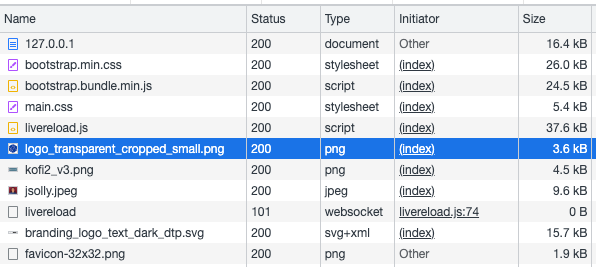
## Before Optimization
## After making changes with WhiteNoise + GzipMiddleware
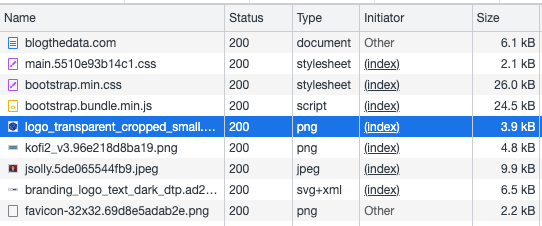
Many of the files are smaller. For example, main.css went from 5.4 kB to 2.1 kB. That’s a -61% decrease in size!
| File | Before | After | Percent Change |
|---|
| main.css | 5.4 kB | 2.1 kB | -61% 🔻 |
| index.html | 16.4 kB | 6.1 kB | -63% 🔻 |
| branding_logo.svg | 15.7 kB | 6.5 kB | -59% 🔻 |
| jsolly.jpeg | 9.6 kB | 9.9 kB | +3% ▲ |
| kofi.png | 4.5 kB | 4.8 kB | +7% ▲ |
| favicon.png | 1.9 kB | 2.2 lB | +16% ▲ |
Unfortunately, images INCREASED in size. Doesn’t appear that WhiteNoise compresses images. That makes sense because image compression degrades quality. A colleague suggested the tool [ImageOptim](https://imageoptim.com/howto.html). ImageOptim reduces file size by removing image metadata.
> By default ImageOptim removes invisible metadata from images, such as EXIF camera information and color profile. ImageOptim overwrites the files with their optimized versions. This is safe, because ImageOptim preserves image quality.
It blows my mind how much the tool reduces image size.
| File | Before | After | Percent Change |
|---|
| jsolly.jpeg | 9.6 kB | 8.9 kB | -7% 🔻 |
| kofi.png | 4.8 kB | 2.1 kB | -56% 🔻 |
| favicon.png | 2.2 kB | 1 kB | -55% 🔻 |
## Conclusion
With a handful of lines, you can decrease the size of static assets. Additionally, I found a way to reduce image file size without quality loss by removing image metadata via [ImageOptim](https://imageoptim.com/howto.html). By performing these optimizations, the total payload size went from 50.6 kB (not including CDN minified assets) to 30 kB for an overall reduction of 40**%.** For small websites like mine, you might not notice 20 kB, but imagine a large, media-rich site reducing its size by 40%
Add compression and minification to your static assets today!
June 17, 2022 in [Web Dev](https://www.jsolly.com/blog/category/web-dev/)
Updated November 6, 2024