---
canonical: "https://www.jsolly.com/blog/conventional-commits/"
title: "Git Good: Making the Move to Conventional Commits"
description: "Learn the importance of good commit messages and the structure of Conventional Commits with an example in VScode."
author: "John Solly"
published: "2022-01-23T19:18:48.000Z"
updated: "2022-01-23T19:18:48.000Z"
---
# Git Good: Making the Move to Conventional Commits

Recently read [this article](https://www.freecodecamp.org/news/how-to-write-better-git-commit-messages/) by Natalie Pina who stresses the importance of writing good commit messages. I'm guilty. Many commits are simply, "WIP" which is short for "Work in Progress." That changes today! I now use a format called 'Conventional Commits'
Conventional commits follow a structure
<type>[optional scope]: <description>

[optional body]

[optional footer(s)]
The is one of the following options:
- `feat` – a new feature is introduced with the changes
- `fix` – a bug fix has occurred
- `chore` – changes that do not relate to a fix or feature and don't modify src or test files (for example updating dependencies)
- `refactor` – refactored code that neither fixes a bug nor adds a feature
- `docs` – updates to documentation such as a the README or other markdown files
- `style` – changes that do not affect the meaning of the code, likely related to code formatting such as white-space, missing semi-colons, and so on.
- `test` – including new or correcting previous tests
- `perf` – performance improvements
- `ci` – continuous integration related
- `build` – changes that affect the build system or external dependencies
- `revert` – reverts a previous commit
The states how large the change is and what it touches in the existing codebase. The describes what is changed and the \[body\] goes into more context/background (if needed). Finally, the footer is used to reference any related dev tasks living in tools such as Jira or BugZilla.
I'm not using a formal bug tracking tool, but I could add unique ids to each bug/enhancement to reference in the footer of the commit.
Here's an example in action!
fix: fix foo to enable bar

This fixes the broken behavior of the component by doing xyz.

BREAKING CHANGE
Before this fix foo wasn't enabled at all, behavior changes from <old> to <new>

Closes D2IQ-12345
## Implementing in VScode
There is a plugin called [Conventional Commits](https://marketplace.visualstudio.com/items?itemName=vivaxy.vscode-conventional-commits&ssr=false#overview) that makes this super straight forward. Once you install the plugin, you'll get a little circle in VScode:
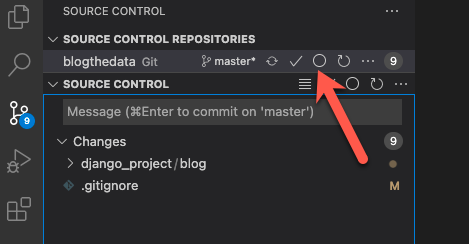
You can see in the image above I've already staged a change...a modification to my .gitignore file.
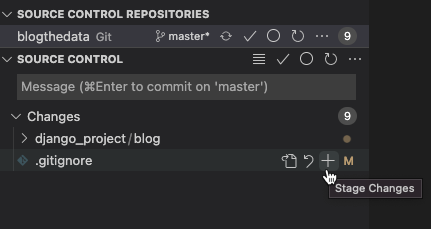
You start the commit process by clicking that new circle. The rest of the steps are guided and self-explanatory. Once you finish, push away!
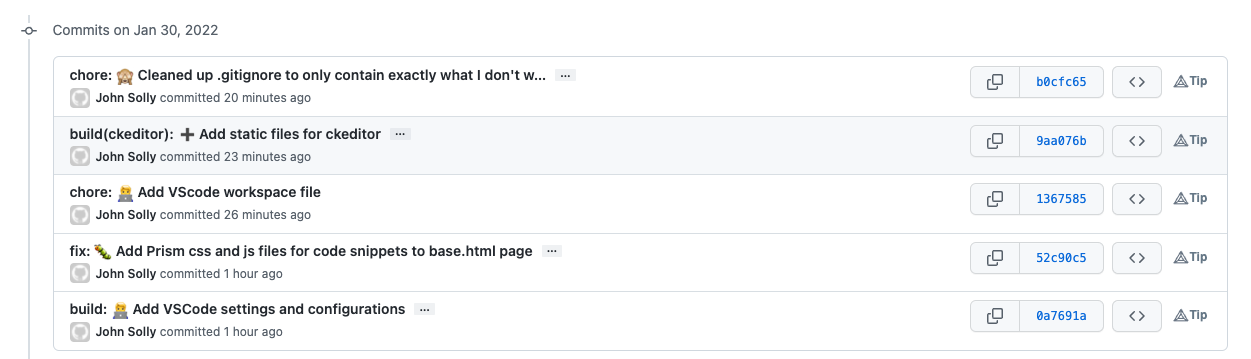
## This is what the commits look like in Git
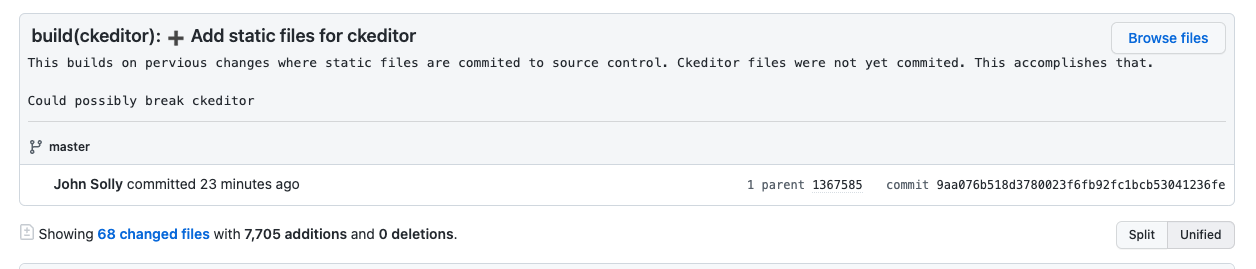
## If you click on one of the commits, you see the whole thing
I am quite happy with conventional commits. I can hear my future self thanking me. Hope you like them too! If you use another style of commits, let me know in the comments!
January 23, 2022 in [Dev Tools](https://www.jsolly.com/blog/category/dev-tools/)
Updated January 23, 2022