---
canonical: "https://www.jsolly.com/blog/deploy-to-remote-server-on-push-in-10-lines/"
title: "Simplifying Automatic Deployments: Using Git Pull With CI Workflow"
description: "Simplifying Automatic Deployments: How I used an SSH job in my CI workflow to deploy updates to blogthedata.com"
author: "John Solly"
published: "2022-07-24T22:28:40.818Z"
updated: "2024-11-06T13:40:06.966Z"
---
# Simplifying Automatic Deployments: Using Git Pull With CI Workflow
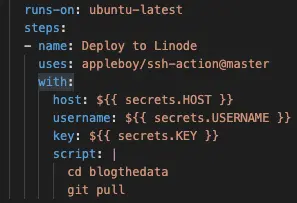
I was researching ways to automatic deployments for blogthedata.com when I push code into main and everything I came across was super complicated. The solution I came up with was to just add a job to my existing CI workflow to SSH into my server and do a `git pull`. I implemented it in [this PR](https://github.com/jsolly/awesome-django-blog/pull/124).
  deploy:
    runs-on: ubuntu-latest
    steps:
    - name: Deploy to Linode
      uses: appleboy/ssh-action@master
      with:
        host: ${{ secrets.HOST }}
        username: ${{ secrets.USERNAME }}
        key: ${{ secrets.KEY }}
        script: |
          cd blogthedata
          git pull
Check out the [AppleBoy Repo](https://github.com/appleboy/scp-action) for the latest instructions.
## Caveats
1 - If I need to perform a database migration, I still have to do that manually.
July 24, 2022 in [Dev Tools](https://www.jsolly.com/blog/category/dev-tools/)
Updated November 6, 2024