---
canonical: "https://www.jsolly.com/blog/how-to-get-100-percent-unit-test-coverage/"
title: "Achieving 100% Unit Test Coverage | A Step-by-Step Guide"
description: "Learn how to achieve 100% unit test coverage in your application with this step-by-step guide, covering route, view, model, form testing and more."
author: "John Solly"
published: "2022-04-08T03:03:14.000Z"
updated: "2022-04-08T03:03:14.000Z"
---
# Achieving 100% Unit Test Coverage | A Step-by-Step Guide
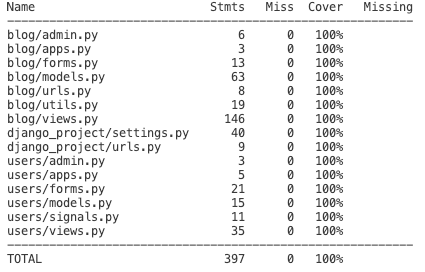
[I made a a commitment 12 days ago](https://www.jsolly.com/blog/test-strategy-no-existing-tests/) to achieve 100% unit test coverage (starting at 0%). Promise, fulfilled!
Curious about unit testing your app?
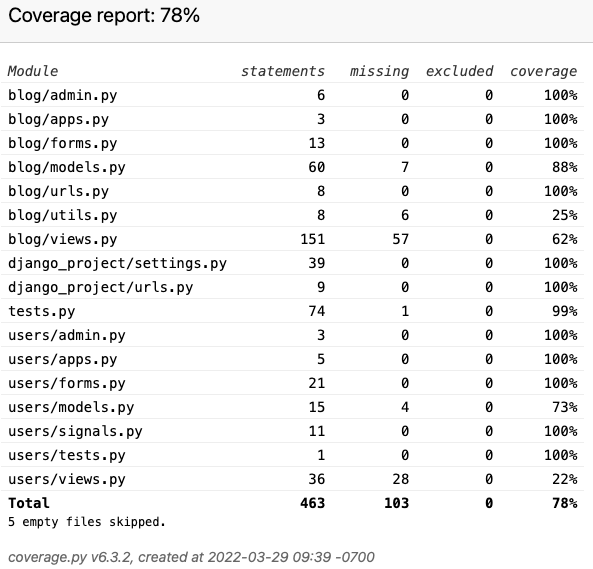
The first step is to figure out where you stand with current test coverage. Python has an excellent library called [coverage](https://pypi.org/project/coverage/) that tells you how many statements your tests touch and what is missing. Output looks like this:
The lowest hanging fruit is ensuring routes hook up to the correct View. Here, I’m testing the home route links to the HomeView.
def test_home_url_is_resolved(self):
    self.assertEqual(resolve(self.home_url).func.view_class, HomeView)
After testing routes, move on to Views. For basic Views, you check that a GET results in a 200 (OK) response and the response is using the correct HTML template.
def test_post_detail_view(self):
        response = self.client.get(self.post1_detail_url)
        self.assertEqual(response.status_code, 200)
        self.assertTemplateUsed(response, 'blog/post_detail.html')
The next step is testing Models. We test objects can be created and any methods work as expected. In my case, a Comment associates to a single Post and author. On line 3, we check that the \_\_str\_\_ override method returns Comment content.
def test_comment(self):
        test_comment = Comment.objects.create(post=self.post1, content="I am a comment", author=self.user1)
        self.assertEqual(str(test_comment), "I am a comment")
        self.assertEqual(test_comment.get_absolute_url(), self.post1_detail_url)
Moving on to Forms…Forms are the way Views structure data to be passed into Models, creating new objects. My Post object has 13 attributes. Some are user-provided (content, slug, snippet) whereas others internally generated (likes, views, date posted).
def test_post_form_valid_data(self):
        form = PostForm(data={
            "title": "My Second Post",
            "slug": "second-post",
            "category": "productivity",
            "metadesc": "I can make you more productive!",
            "draft": False,
            # "metaimg" : ""
            # "metaimg"_mimetype : ""
            "snippet": "Do the things",
            "content": "Do the things. All the things",
            # date_posted : ""
            "author": self.user1
            # "likes"
            # "views"

        })

        self.assertTrue(form.is_valid())
That’s it! My next step is to create integration and acceptance tests. Unlike unit testing, there's no 0-100%. You can write infinite amounts of integration and acceptance tests.
Until next time!
April 8, 2022 in [Dev Tools](https://www.jsolly.com/blog/category/dev-tools/)
Updated April 8, 2022