---
canonical: "https://www.jsolly.com/blog/how-to-get-perfect-linting-compliance/"
title: "Adhering to PEP 8 Style Guidelines: Cleaning Up Blogthedata.com Code"
description: "Rid your code of errors, bugs, stylistic errors, and suspicious constructs. Use linters to take your app to the next level!"
author: "John Solly"
published: "2022-05-06T17:35:08.000Z"
updated: "2026-09-07T14:25:05.469Z"
---
# Adhering to PEP 8 Style Guidelines: Cleaning Up Blogthedata.com Code

Blogthedata.com is coming together! We now have [perfect\* Google Lighthouse score](https://www.jsolly.com/blog/google-lighthouse-perfect-score/), open issues\[1, 2\] to achieve a [perfect\* Mozilla Observatory](https://www.jsolly.com/blog/how-to-get-a-perfect-mozilla-observatory-score/) score, and [100% unit test coverage](https://www.jsolly.com/blog/how-to-get-100-percent-unit-test-coverage/).
Now, what about the code style? That's where linting comes in. There are [several linters](https://www.slant.co/topics/2692/~best-python-code-linters) for Python, I use Pylint.
VScode has [native Pylint integration](http://code.visualstudio.com/docs/python/linting). Pylint analyzes your code for several issues including very Pythonic things like ensuring [variables conform to snake casing](https://peps.python.org/pep-0008/#naming-conventions) (sorry JavaScript 😆) as well as data structure suggestions such as when it might be better to [use a tuple over a list](https://pylint.pycqa.org/en/latest/messages/refactor/consider-using-tuple.html). Most Pylint suggestions are based on Python's famous [PEP 8 style guide](https://peps.python.org/pep-0008/) authored by the great Guido van Rossum.
Now, it's time to spill the beans. I don't 'exactly' have 100% Pylint compliance. I added the following to my VScode settings.json to ignore some Pylint checkers:
# settings.json
{
    "python.linting.pylintArgs": [
        "--disable=C0301",
        "--disable=C0114",
        "--disable=C0115",
        "--disable=C0116",
        "--disable=E0401",
    ]
}
[C0301](https://pylint.pycqa.org/en/latest/messages/convention/line-too-long.html) - Line too Long
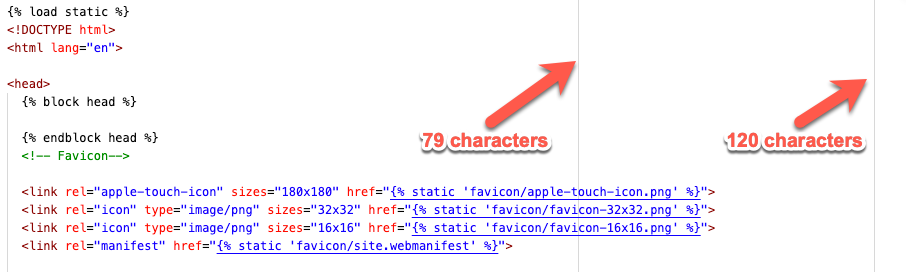
I don't like lines being too long, but sometimes code just makes more sense on one line even if it’s long. I do include the following rulers in VScode to see PEP 8's line length guidelines within the editor.
# settings.json
{"editor.rulers": [79, 120]}
## Rulers in VScode
[C0114](https://pylint.pycqa.org/en/latest/messages/convention/missing-module-docstring.html), [C0115](https://pylint.pycqa.org/en/latest/messages/convention/missing-class-docstring.html?highlight=C0115), [C0116](https://pylint.pycqa.org/en/latest/messages/convention/missing-function-docstring.html?highlight=C0116), (missing class, module, function docstrings)
I am no stranger to documentation. I love documenting things! That being said, I will soon be 'reactifying' blogthedata.com which will drastically change code architecture. Once I split the front and backend of the app, I'll turn these checkers back on so I can crank out documentation.
[E0401](https://pylint.pycqa.org/en/latest/messages/error/import-error.html?highlight=E0401) - import-error
I haven't quite figured this one out. The error is supposed to be about a failed import, but I’ve run into cases where Pylint says the import is failing, but it's clearing working in my code. I turned the error off until I can figure out why Pylint is confused.
Other than those exclusions, blogthedata.com is Pylint compliant and attempts to follow PEP 8 style guidelines wherever possible.
Get a linter and clean up yo code!
May 6, 2022 in [Dev Tools](https://www.jsolly.com/blog/category/dev-tools/)
Updated September 7, 2026